Every SamaraBoT robotic arm comes with a companion: a small piece of software called the SamaraBot Control app. It runs on a normal computer, connects to the robot through a USB cable, and gives the student complete control over every joint.
Without the app, the robot would be silent and still. With it, the arm can move, pick up parts, follow a saved routine, and repeat a full automation cycle again and again.
In this article we explain what the SamaraBot Control app is, what it does, and what students learn from using it.
What is the SamaraBot Control app?
The SamaraBot Control app is a desktop application designed for one purpose: to let a student control the SamaraBoT arm in a way that feels natural, teaches real robotics workflow, and never hides what is happening inside the robot.
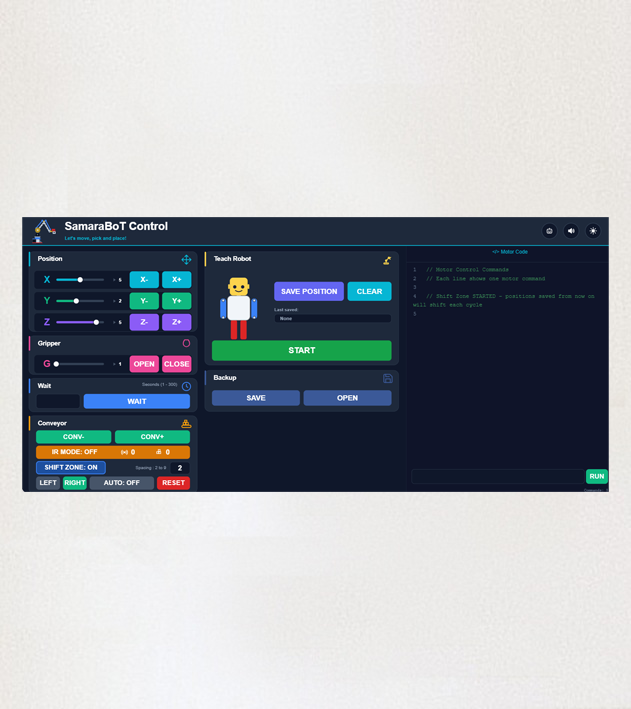
It connects to the arm over a standard USB cable. On the screen, the student sees the position of each joint, a set of jog buttons, a live window of motor code, and a Start button that runs the entire program.
Every action the student takes — pressing a button, moving a slider, saving a position — is sent to the robot in real time. The arm responds immediately.
What can a student do with the app?
The SamaraBot Control app lets a student do five main things:
1. Move each joint individually.
Using on-screen jog buttons, the student can move the arm left, right, up, down, forward, and backward, one small step at a time. Each press sends a precise command to the motor, and the arm responds instantly.
2. Control the gripper.
The same idea applies to the gripper: open it, close it, and adjust how tightly it holds a part. The app shows exactly how open or closed the gripper is at any moment.
3. Save positions as teach points.
When the arm is in the right place, the student presses SAVE POSITION. The app records the exact position of every joint, and that position becomes one step in the program. Later, the student can save another position, and another, until the whole sequence is built.
4. Run the full program.
Once a few positions are saved, the student presses START. The arm moves through every saved position in order, then repeats the cycle. This is how a real industrial robot is programmed — by teaching it positions and letting it repeat them.
5. See every command as code.
This is the part that makes the app special. On the right side of the screen, a window called Motor Code shows every action as a line of real code. When the student presses a button, a new line appears. When they save a position, the whole position appears as motor commands.
Students see, in real time, how a button press becomes real code — and how that code becomes physical motion.
How does the app turn a button into motion?
When a student presses a jog button, here is what happens behind the scenes:
- The app calculates how far the joint should move based on the step size.
- It sends a digital command to the control board over USB.
- The control board reads the command and sends the right number of pulses to the correct motor.
- The motor turns by exactly that amount, and the arm moves.
All of this happens in a fraction of a second. From the student’s point of view, they pressed a button and the arm moved. But inside, a full chain of commands traveled from the app to the board to the motor.
This chain is exactly how every real industrial robot is controlled.
Why does the app show the motor code?
The Motor Code window is not decoration. It is the heart of the learning experience.
Most beginner robotics tools hide what the robot is doing. The student presses a button, the robot moves, and nothing else is visible. This works — but it does not teach how the machine actually thinks.
The SamaraBot Control app does the opposite. Every button press is translated into a real line of code in front of the student’s eyes. After a few minutes, students start to see patterns: this button produces this command, this command moves this motor by this amount.
By the end of a workshop, most students can read the code window and predict what will happen next. Some of them start typing commands by hand, just to see what happens.
This is the moment when a student stops being a user and starts being a programmer.
What does the app teach students?
The SamaraBot Control app is a teaching tool disguised as a control panel. It teaches:
The link between software and hardware.
The student sees how a click on the screen becomes a physical movement in the real world.
The idea of teach points.
Real industrial robots are not programmed line by line. They are taught positions. The app makes this workflow natural and visible.
The importance of precision.
When a position is saved, the arm returns to it exactly. If the student saves a sloppy position, the arm returns to a sloppy position. Precision starts with the student.
Safety habits.
The app locks buttons while a program is running. It stops the robot cleanly when a limit is reached. It shows students that good software protects the machine and the people around it.
Reading code, not just writing it.
Before students write their own code, they learn to read code that the app produces. This is a skill every engineer uses daily.
A small window into a big world
The SamaraBot Control app is not just a way to move a robot. It is a window into how real automation works.
Every industrial robot in a factory is programmed by teaching it positions, saving them, and running a sequence. Every robot is controlled by software that translates human intent into machine commands. Every command has a visible consequence.
The SamaraBot Control app puts all of this on a single screen, in a size that fits on a desk, for a price that fits a classroom.
That is the real lesson behind the SamaraBot Control app.